Guide
Free baby nap predictor app: Cami's Sleep Forecast
Sleep Forecast in Cami: Baby Tracker predicts your child's next nap and bedtime from your own log. It is free on iPhone and starts once you log naps.

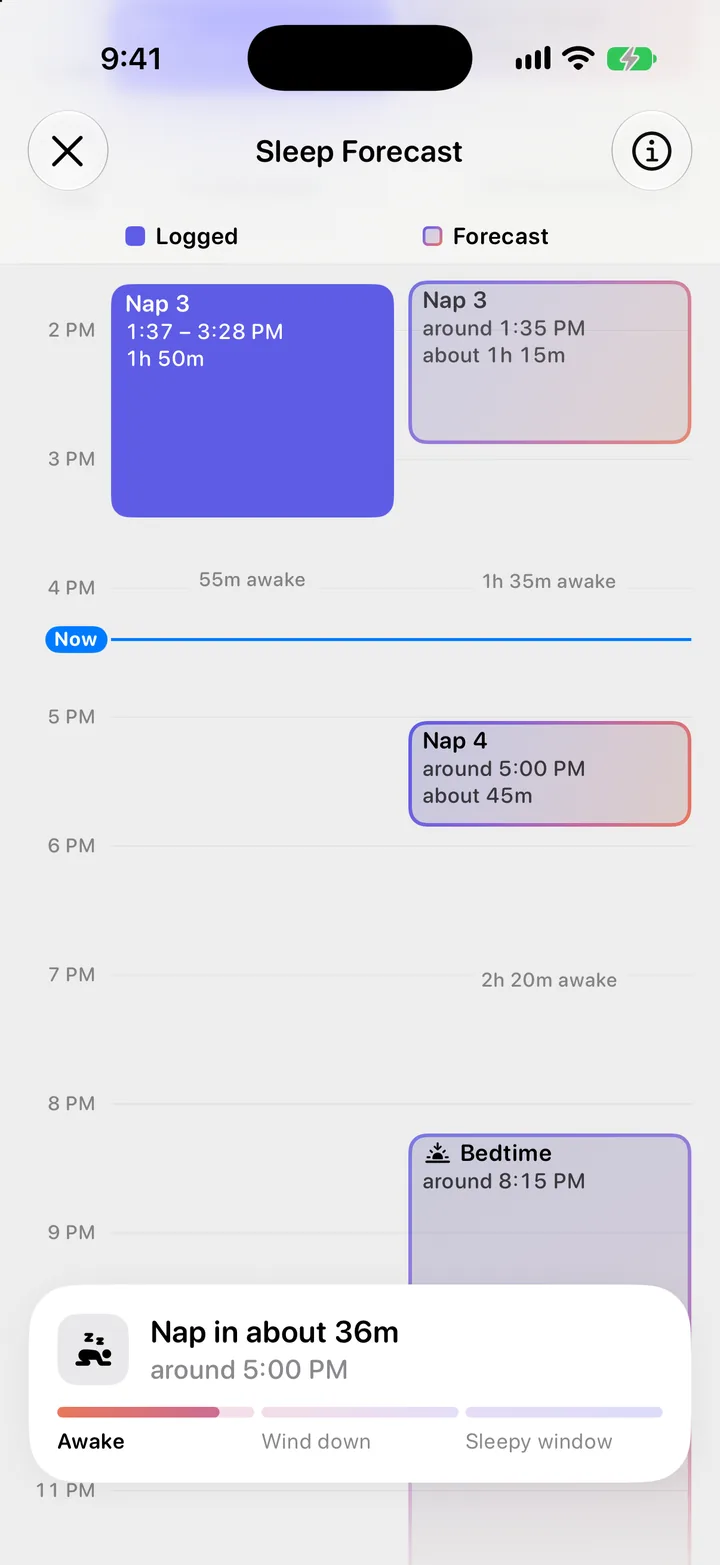
This guide explains what Sleep Forecast shows, how it learns your child’s rhythm, how to start, and what it is not. It does not tell you how long your child should be awake, how many naps to take or how long a nap should be. For that, ask your pediatrician.
What Sleep Forecast shows
Sleep Forecast reads the sleeps you log and forecasts the rest of the day. Each time is “around” a time, with a window, never an exact minute. You find it in five places:
- On Home. A card under Today says when the next nap is likely, for example Nap around 3:45 PM. A bar shows if your child is Awake, in the wind down or in the sleepy window.
- The whole day. Tap the card. The day screen puts what you logged beside what was forecast: the naps ahead, the time awake between them, and bedtime.
- Nap reminders. Optional, and off until you turn them on. A reminder arrives when the wind down begins. They are set on each phone, for each child.
- A widget. On the Home Screen or the Lock Screen, with the next sleep for the child you choose.
- Its own score. Rate each day with a thumbs up or a thumbs down. The Prediction Accuracy card shows how many of the last naps began within 30 minutes of the forecast, from a replay of your own log.
Every screen, with pictures: Sleep Forecast.
How it learns your child’s rhythm
- It starts from age. On the first day, it uses what is usual at your child’s age.
- It follows your log. It reads the last three weeks of sleeps you logged, and recent days count most. After about five days of logging, it follows your child more than their age.
- It works out how your child naps. Some children nap by the clock, some by time awake. Sleep Forecast looks at both and leans on whichever has been steadier lately.
- It changes during the day. An early wake, a short nap or a skipped nap moves everything after it. The forecast is drawn again each time you log a sleep.
- It runs on your iPhone. The forecast and its score are worked out on your phone, from your family’s log. Nothing extra is sent anywhere for it.
Sleep Forecast also holds your child’s own wake windows, one for each place in the day, read from your log. Open More, Sleep Forecast to see them. If you want the forecast to stay inside a range of your own, turn on Set my own range.
Free, and in your language
Sleep Forecast is part of Cami for everyone. Cami is free during early launch, and there is no paid plan today. See Is Cami free?
The app, the forecast and the reminders are in English (US and UK), Spanish (Latin America and Spain), French, German, Italian, Dutch, Portuguese (Portugal), Polish, Swedish, Danish, Norwegian and Finnish.
How to start
- Get Cami from the App Store and add your child.
- Log each sleep: tap Sleep on Home when your child falls asleep, and again when they wake. Log the morning rise and bedtime too.
- That is all. Sleep Forecast turns on by itself for a child whose naps you log, and the card appears on Home.
To turn it off, or on for yourself, open More, Sleep Forecast and use the Sleep Forecast switch. For nap reminders, turn on Nap reminders on the same screen. Logging sleep, step by step: Sleep and naps.
Already logging in Huckleberry? Bring your history with you, and the forecast has more to read from the first day. See Import your Huckleberry history.
What it is not
- Not a schedule. It forecasts. It does not plan your child’s day, and you do not have to keep to it.
- Not ahead of your child’s cues. If your child looks sleepy before the forecast says so, trust what you see.
- Not medical advice. Sleep changes with growth, illness, teething and travel. For questions about sleep or health, talk with your pediatrician. For safe sleep, see the AAP’s safe sleep guidance.
Sleep Forecast and Huckleberry SweetSpot
SweetSpot® is Huckleberry’s nap-time feature. The Huckleberry column was checked on 19 November 2026. Apps change, so follow each link for the current wording.
| Cami Sleep Forecast | Huckleberry SweetSpot®, as of 19 November 2026 | |
|---|---|---|
| Plan | Part of the free app. | “SweetSpot is part of Huckleberry Plus and Huckleberry Premium” (SweetSpot). The Free plan marks it “Not included” (pricing). |
| Age | Starts from what is usual at your child’s age, then follows their own log. | “Available at 2+ months” (SweetSpot). |
| Languages | English (US and UK), Spanish (Latin America and Spain), French, German, Italian, Dutch, Portuguese (Portugal), Polish, Swedish, Danish, Norwegian and Finnish. | The help center says the app is only in English (Huckleberry help). |
Huckleberry also offers sleep plans and coaching, which Cami does not. A side by side of the two apps: Huckleberry alternative.
Questions
Is Sleep Forecast really free?
Yes. It is part of Cami for everyone, with nothing to unlock. Cami is free during early launch.
How soon is the forecast useful?
It forecasts from the first day, starting from your child’s age. After about five days of logging, it follows your child more than their age. The more complete the log, the closer it gets: log every nap, the morning rise and bedtime.
Is it accurate?
Cami shows you, for your own child. The Prediction Accuracy page says how many of the last naps began within 30 minutes of the forecast, day by day. The next nap is the firmest part. Later naps and bedtime are less certain, because each one depends on the sleeps before it.
Does it give wake windows by age?
No. Cami does not set wake windows for you to keep. With a new log, the forecast starts from what is usual at your child’s age. After that, it shows your child’s own wake windows, read from your log. For guidance by age, ask your pediatrician.
Does my partner see the same forecast?
Yes. The forecast reads your family’s shared log, so a nap your partner logs moves it on your phone too. Nap reminders are set on each phone.
Can I use it without logging naps?
No. Sleep Forecast reads your log. A child with no naps logged lately has it off, and it turns on by itself when you log naps.
Try Sleep Forecast
Cami: Baby Tracker is free on the App Store for iPhone, in 28 countries across the Americas, Europe and Oceania. Download Cami on the App Store, add your child and log today’s naps.
Step by step
- Sleep Forecast, when the next nap is likelySleep Forecast reads your child's own log to show when the next nap and bedtime are likely. Tap the card under Today on Home to see the whole day.
- Track sleep and naps, and how night vs nap is decidedTap Sleep on Home, then Start Sleep. Cami files each sleep as night sleep or a day nap by the time it starts, using the hours in More › Day & Night.
- Notifications and reminders in CamiCami has three reminders: nap reminders, a growth reminder to weigh and measure, and a pump alarm. It does not notify you when someone logs.
- Widgets and Control Center controlsCami has widgets for the Home Screen and the Lock Screen, and two controls. Touch and hold the Home Screen or Lock Screen, add a widget, and pick Cami.
- Import your Huckleberry historyExport a CSV from Huckleberry. In Cami, open More › Settings › Import & Export, tap your child, then Import Data › Import from Huckleberry.
Cami: Baby Tracker is free on the App Store for iPhone.
Get Cami
Still need help?
Write to us and a person reads it, usually within a day. From the app, Get Help attaches the details that help us fix it, and our reply shows in Cami.
In Cami: More › Help Center › Get Help