
Export your child's log as a CSV file
Open More › Data & Privacy, tap your child, then Export Data and save the file. Each child can be exported once every 24 hours.
On this page
Export a child’s log
- Open More, Data & Privacy and tap your child under Manage Data.
- Tap Export Data.
- When the save sheet opens, choose a folder in Files and save.
In Cami 1.2: open More › (your child)'s Data, then tap Export Data.
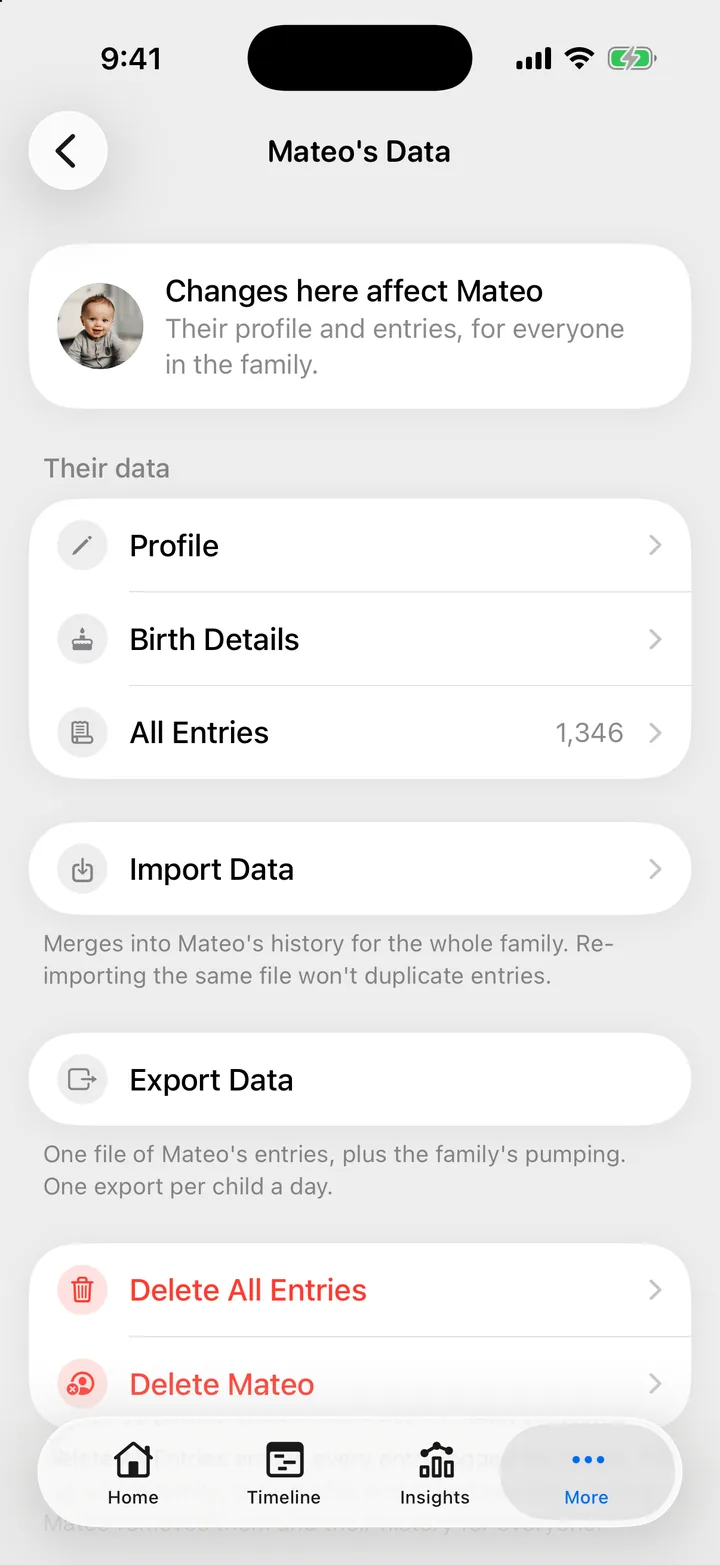
You can also get there from More, Children: tap the child, then Manage Data.
The file is named after your child and the date, for example
Mateo-2026-09-25.csv, so two children exported on the same day do not
overwrite each other.
Once every 24 hours, per child
Every member of the family can export, and each child has one export every 24 hours for the whole family. The 24 hours start when the export begins, not at midnight. While the wait runs, the Export Data row says when it is available again.
- Two children are two separate allowances. You can export both on the same day.
- If you close the save sheet without saving, Cami keeps the file. Tap Export Data again to save it. That does not count as a new export.
- If the download stops halfway, that day’s export is still used.
What is in the file
One row per entry, oldest first, with these columns:
| Column | What it holds |
|---|---|
type |
The kind of entry: sleep, nursing, bottle, diaper, pumping, and so on |
start |
When it started, in your iPhone’s time zone |
end |
When it ended. Empty if it was still running when you exported |
duration_seconds |
How long it lasted, in seconds |
amount_ml |
For bottles and pumping, the amount in milliliters, even if you use ounces in the app |
details |
A short summary for the kind, for example the time on each side for nursing, or the kind of diaper |
note |
Your note |
The file holds your child’s entries plus every pumping session in the family, because pumping belongs to the family rather than to one child.
What is not in the file
- Names, including who logged each entry.
- Your child’s profile, birth details and photos.
- Entries you deleted.
The file opens in Numbers, Excel, Google Sheets or any app that reads CSV.
Ask for your data by email
To ask for a copy of what Cami holds about you, write to hello@camibaby.com. The privacy policy says what is kept and for how long.
Troubleshooting
Cami says this child's data was already exported in the last 24 hours
Someone in your family, or you, exported this child less than 24 hours ago. The message and the Export Data row say when you can export again. Another child in the family can still be exported today.
The export stopped before it finished
Check your connection. If you tried in the last 24 hours, you may need to wait until the row says the export is available again.
Pumping appears in both of my children's files
That is expected. Each file carries all of the family’s pumping. Read each file on its own.

Still need help?
Write to us and a person reads it, usually within a day. From the app, Send Feedback attaches the details that help us fix it.
In Cami: More › Settings › Send Feedback