
Which iPhones, countries and languages Cami supports
Cami runs on iPhone with iOS 26 or later. It is on the App Store in the United States and Mexico, in English and Spanish.
On this page
iPhone and iOS
- iPhone: any iPhone that runs iOS 26 or later.
- Other devices: Cami is an iPhone app. There is no Android, iPad, Apple Watch or web version.
To check your iOS version, open Settings › General › About on your iPhone.
Want Cami on another device? Vote for it or suggest it on the roadmap: see Contact support, send feedback and vote on the roadmap.
Countries
Cami is on the App Store in the United States and Mexico. If the App Store doesn’t show Cami, your Apple Account is set to another country.
Languages
Cami is in English and Spanish (Latin America). Cami follows your iPhone’s language. Each person in your family can use Cami in their own language. Cami’s own words, like the name of each kind of entry, show in each person’s language. What you type, like notes, stays as you wrote it.
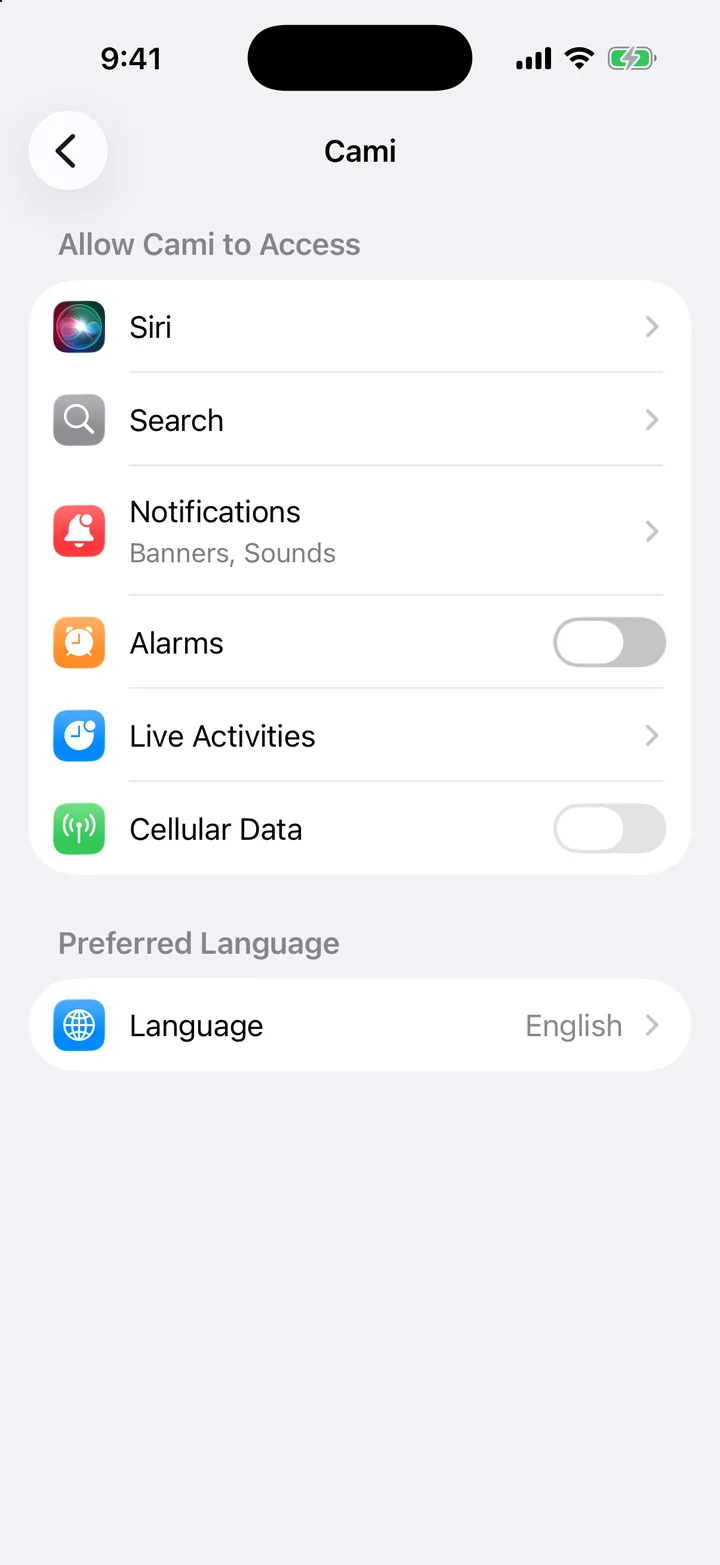
To use Cami in a language that is different from your iPhone’s:
- Open the Settings app on your iPhone.
- Tap Apps, then Cami.
- Tap Language and choose English or Spanish.

Still need help?
Write to us and a person reads it, usually within a day. From the app, Send Feedback attaches the details that help us fix it.
In Cami: More › Settings › Send Feedback