Choose and reorder what Home shows
On Home, tap the Customize Home button beside Track. Hide the rows you don't use, drag to reorder, and tap Save changes.

Hide, show and reorder rows
- On Home, scroll to Track and tap the button at the right of the heading (Customize Home).
- To hide a row, tap the minus button beside it. It moves down to More.
- To show a hidden row again, tap the plus button beside it under More.
- To reorder, drag a row by its handle.
- Tap Save changes.
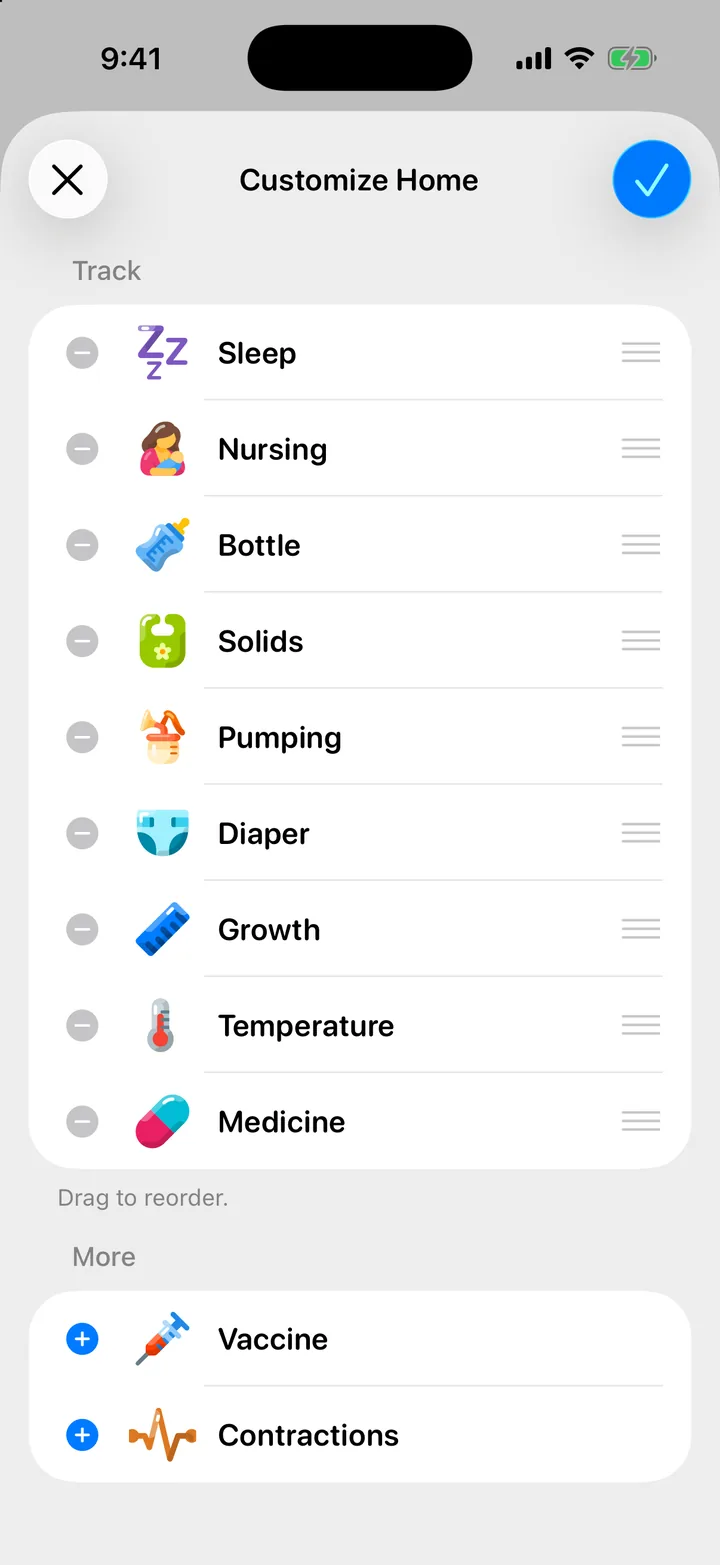
Nothing changes on Home until you tap Save changes. To leave without changes, tap Cancel.
What this changes
- Only the Track rows. The pills under Today follow what you log, so there is nothing to set for them. See Today so far and “usual”.
- Only this iPhone. Your partner’s Home keeps its own layout.
- Nothing in your log. Hiding Bottle does not delete bottles, and the Timeline and Insights still show them.
If you hide every row, Home shows a Customize Home button in their place, so you can bring them back.

Still need help?
Write to us and a person reads it, usually within a day. From the app, Send Feedback attaches the details that help us fix it.
In Cami: More › Settings › Send Feedback